If your job requires a screen, a traditional digital detox — phone off, laptop closed — simply isn’t an option. But that doesn’t mean you’re stuck with constant digital overload. A detox for people who work online has to target the compulsive, non-essential use layered on top of necessary work, not the work itself.
Separate “Work Screen Time” From “Everything Else Screen Time”
The first step is distinguishing the two clearly. Work requires your laptop and probably email — that’s fixed. What’s not fixed is checking Instagram between tasks, opening five news tabs “for a quick break,” or reflexively picking up your phone every time you’re waiting for something to load. The detox targets that second category specifically.
Use Separate Browsers or Profiles for Work and Everything Else
Set up a dedicated browser (or browser profile) with only work-related bookmarks, extensions, and logins. Use a different browser entirely for personal browsing, and don’t log into personal social accounts on your work profile. This creates a real boundary that a single shared browser tab bar doesn’t.
Block Distracting Sites During Work Hours
Website blockers (many are free browser extensions) can restrict access to social media, news sites, and other time-sinks during set hours. The point isn’t total prohibition — you can usually override them if truly needed — but the extra step of disabling a blocker adds enough friction to stop most reflexive visits.
Batch Non-Essential Tabs and Notifications
Close tabs unrelated to your current task instead of letting them accumulate in the background, silently pulling at your attention. Turn off all non-essential notifications during work blocks — Slack and email can usually wait in short batches rather than being checked continuously.
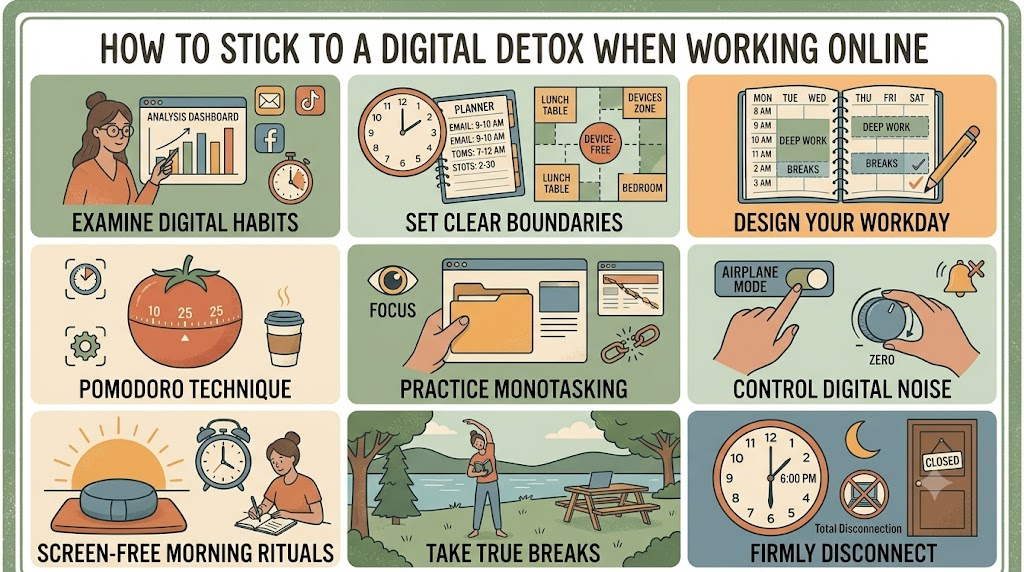
Use the Pomodoro Technique to Create Real Breaks
Work in focused blocks (25–50 minutes), then take a genuine break — but make it a screen-free break: stand up, stretch, look out a window, get water. Using your “break” to scroll social media doesn’t actually rest your attention; it just shifts it to a different, equally demanding source.
Set a Hard Stop for Work Devices
One of the biggest sources of digital overload for online workers is the blurred line between “done for the day” and “still checking email at 9pm.” Set a specific time your laptop closes and stays closed. If something is truly urgent, a phone call will find you; most things can wait until morning.
Keep Personal Devices Out of Reach During Work Blocks
Even if your phone stays off for work purposes, a separate personal phone sitting nearby is a constant source of temptation and interruption. Put it in another room, a drawer, or a bag during focused work periods, and only bring it back during scheduled breaks.
Track Non-Work Screen Time Specifically
Most phones and browsers let you filter screen time reports by app category. Check your non-work usage weekly, separate from work tools, so you have a clear, honest picture of how much of your day is actually going to distraction rather than to your job.
Working online doesn’t mean you’re exempt from a digital detox — it just means the detox has to be more surgical, targeting the layer of compulsive, non-essential screen use rather than the screen itself.
Leave a Reply